Time Protocol - Let's Sync it to Reference Clock
Overview
Network Time Protocol (NTP) is to synchronize network device clock to a reference clock. A reference clock provides accurate time similar to an atomic clock or a GPS clock. Reference clocks are stratum 0 within the NTP hierarchy.
Network Engineers review device logs to troubleshoot issues in the network. For example, a user reports that their network had an issue at 13:10 on December 26, 2025. Device logs are reviewed to correlate the timestamps to confirm if a device had any network events.
Device Clock
All devices (routers, switches, PC and so on) have an internal clock. In Cisco IOS, device time can be viewed by show clock command.
1
2
R1#show clock
*00:16:00.857 UTC Sat Dec 26 2025
The default time zone is UTC (Coordinated Universal Time). The show clock detail command reveals the time source.
1
2
3
R1#show clock detail
*00:16:00.857 UTC Sat Dec 26 2025
Time source is hardware calendar
The asterisk means, time is not considered authoritative. Next line, Time source is hardware calendar means the hardware calendar is the default time source. The internal clock of a device is unreliable source time.
Show logging command
Following logs demonstrate Interface Ethernet0/0 administratively going down then brought up again within 14 seconds. Logs shows here are called Syslog each section from date, time, sequence, utility, description and more are defined in it’s own section.
1
2
3
4
5
6
7
8
rtr01#show logging
Jan  1 00:05:04.249: %LINK-5-CHANGED: Interface Ethernet0/0, changed state to administratively down
Jan  1 00:05:05.249: %LINEPROTO-5-UPDOWN: Line protocol on Interface Ethernet0/0, changed state to down
Jan  1 00:05:06.685: %DHCPD-7-NO_LEASE: DHCP lease assignment failure, client 5254.00d8.d5e9 reason NO POOL
Jan  1 00:05:17.836: %LINK-3-UPDOWN: Interface Ethernet0/0, changed state to up
Jan  1 00:05:18.837: %LINEPROTO-5-UPDOWN: Line protocol on Interface Ethernet0/0, changed state to up
Jan  1 00:05:20.053: %SYS-5-CONFIG_I: Configured from console by console
Jan  1 00:05:22.861: %DHCP-6-ADDRESS_ASSIGN: Interface Ethernet0/0 assigned DHCP address 192.168.255.44, mask 255.255.255.0, hostname rtr01
1
2
3
4
5
6
rtr01#show clock
00:08:28.925 UTC Fri Jan 1 1993
!
rtr01#show clock detail
00:12:40.862 UTC Fri Jan 1 1993
Time source is user configuration
The show clock detail confirms the displayed clock is hardware calendar.
Manual Time configuration
Devices can be manually configured using clock set command the using question mark to view the next parameters required.
1
2
3
4
5
6
7
8
9
10
11
12
13
14
15
16
17
18
19
20
21
rtr01#clock set ?
  hh:mm:ss  Current Time

rtr01#clock set 21:49:00 ?
  <1-31>  Day of the month
  MONTH   Month of the year

rtr01#clock set 21:49:00 23 ?
  MONTH  Month of the year

rtr01#clock set 21:49:00 23 feb ?
  <1993-2035>  Year

rtr01#clock set 21:49:00 23 feb 2026
rtr01#
Feb 23 21:49:00.000: %SYS-6-CLOCKUPDATE: System clock has been updated from 00:22:37 UTC Fri Jan 1 1993 to 21:49:00 UTC Mon Feb 23 2026, configured from console by console.
rtr01#
rtr01#show clock detail
21:49:08.729 UTC Mon Feb 23 2026
Time source is user configuration
rtr01#
Hardware calendar, also known as built-in clock, is the default time source. The hardware clock and software clock are separate and can be configured manually.
Hardware Clock (Calendar) Configuration
Hardware clock can also be manually configured with the calendar set command.
1
2
3
4
5
6
7
8
9
10
11
12
13
14
15
16
17
18
19
20
21
rtr01#calendar ?
  set  Set the time and date

rtr01#calendar set ?
  hh:mm:ss  Current Time

rtr01#calendar set 22:00:00 ?
  <1-31>  Day of the month
  MONTH   Month of the year

rtr01#calendar set 22:00:00 23 ?
  MONTH  Month of the year

rtr01#calendar set 22:00:00 23 feb ?
  <1993-2035>  Year

rtr01#calendar set 22:00:00 23 feb 2026 ?
  <cr>  <cr>

rtr01#calendar set 22:00:00 23 feb 2026
rtr01#
Hardware and software clocks are set, however they are out of sync.
1
2
3
4
5
rtr01#show calendar
06:02:47 UTC Tue Feb 24 2026
!
rtr01#show clock
22:05:50.734 UTC Mon Feb 23 2026
Hardware and software clocks needs to be synchronized with each other. Use the following commands to sync the calendar to clock’s time and clock to the calendar’s time.
In our example above, hardware calendar shows the time in future whereas the software clock shows the accurate time.
We will sync the clock to the calendars time.
1
Show a way how to sync the hardware clock to the software clock here including the commands.
Configuring the Time Zone
1
2
3
4
5
6
7
8
9
10
11
12
13
14
15
16
17
18
19
20
21
22
23
24
25
26
27
28
29
30
rtr01(config)#
rtr01(config)#do show clock
14:15:24.815 pst Mon Feb 23 2026
rtr01(config)#
rtr01(config)#clock timezone ?
  WORD  name of time zone

rtr01(config)#clock timezone UTC ?
  <-23 - 23>  Hours offset from UTC

rtr01(config)#clock timezone UTC -8 ?
  <0-59>  Minutes offset from UTC
  <cr>    <cr>

rtr01(config)#clock timezone UTC -8
rtr01(config)#
Feb 23 22:16:00.827: %SYS-6-CLOCKUPDATE: System clock has been updated from 14:16:00 pst Mon Feb 23 2026 to 14:16:00 UTC Mon Feb 23 2026, configured from console by console.

rtr01(config)#do show clock
14:16:12.067 UTC Mon Feb 23 2026
rtr01(config)#exit

rtr01#clock set 22:17:20 23 feb 2026
rtr01#
Feb 24 06:17:20.000: %SYS-6-CLOCKUPDATE: System clock has been updated from 14:17:19 UTC Mon Feb 23 2026 to 22:17:20 UTC Mon Feb 23 2026, configured from console by console.
rtr01#show clock
22:17:26.620 UTC Mon Feb 23 2026
rtr01#show calendar
22:17:34 UTC Mon Feb 23 2026
rtr01#
Daylight Saving Time (Summer Time)
Network device clock needs to be configured to sync with daylight saving time. The following command from 2 Sunday March 02:00 defines the start of DST and 1 Sunday November 02:00 defines the end of DST.
Number 2 in start of DST define the summer time starts 2nd monday of march, similarly number 1 refers to DST ends on first sunday of november.
1
rtr(config)#clock summer-time pst recurring 2 sunday march 02:00 1 sunday november 02:20
Network Time Protocol
We learnt network devices can be setup with clock using a manual method. However, manual configuration on network devices is not scalable. Whereas, NTP allows automatic syncing of time over a network.
Network tool nslookup demonstrates the microsoft and google’s time servers.
1
2
3
4
5
6
7
8
9
10
11
12
13
14
15
16
17
18
19
20
21
22
23
24
C:\Users>nslookup time.windows.com
Server:  dns.google
Address:  8.8.8.8

Non-authoritative answer:
Name:    twc.trafficmanager.net
Address:  168.61.215.74
Aliases:  time.windows.com


C:\Users>nslookup time.google.com
Server:  dns.google
Address:  8.8.8.8

Non-authoritative answer:
Name:    time.google.com
Addresses:  2001:4860:4806:c::
          2001:4860:4806::
          2001:4860:4806:8::
          2001:4860:4806:4::
          216.239.35.12
          216.239.35.8
          216.239.35.4
          216.239.35.0
NTP clients, network devices like routers, switches, PC and such request the time from NTP servers. A device like router or switch can be a NTP client or and server at the same time.
NTP Accuracy is based on location of NTP server, if NTP server is within the LAN it’s accuracy of time withing ~1 millisecond or if the location of NTP server is over a WAN or Internet connection then the accuracy of time will be ~50 milliseconds. The distance of an NTP server from the original reference clock is called stratum. NTP uses UDP port 123 to communicate.
Reference Clocks
A reference clock is usually a very accurate time device like an atomic clock or a GPS clock. Reference clocks are stratum 0 within the NTP hierarchy. NTP servers directly connected to reference clocks are called stratum 1.
NTP Hierarchy
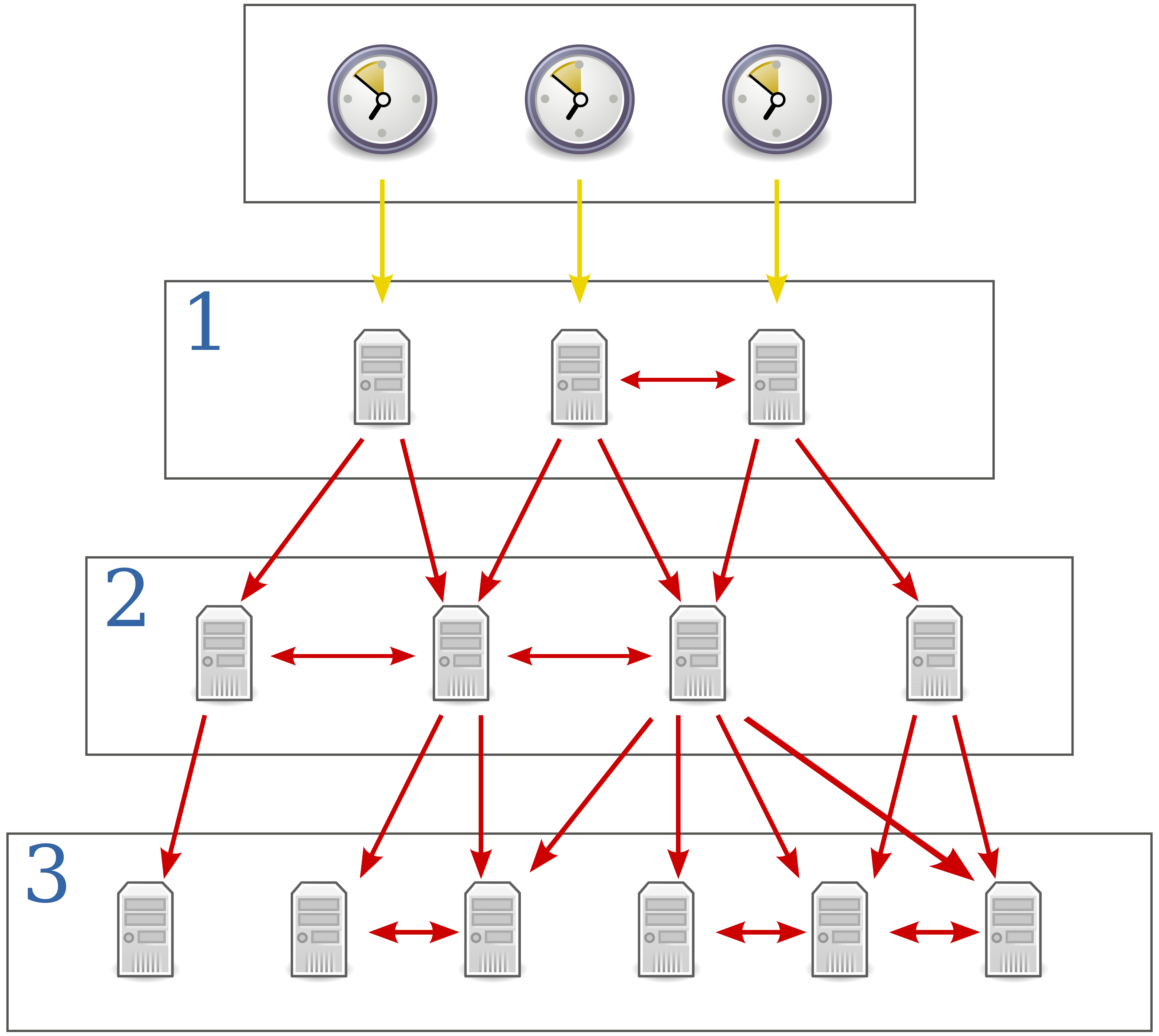
- Reference clocks are stratum 0.
- Stratum 1 NTP servers get their time from stratum reference clocks.
- Stratum 2 NTP servers get their time from stratum 1 NTP servers.
- Stratum 3 NTP servers get their time from stratum 2 NTP servers.
- Stratum 15 is the maximum. Anything above that is considered unreliable.
- Devices can also peer with devices at the same stratum to provide more accurate time. This is called ‘symmetric active’ mode. Cisco devices can operate in three NTP modes:
- Server mode
- Client mode
- Symmetric active mode
- An NTP client can sync to multiple NTP servers.
NTP servers which get their time directly from reference clocks are are also called primary servers. Whereas NTP servers which get their time from other NTP servers are called secondary servers. They operate in server and client mode at the same time.
NTP Configuration
NTP configuration on a network device is done from the global privilege mode. Keyword prefer was used to prefer first ntp server address on router.
1
2
3
4
5
6
7
8
9
10
11
12
13
14
15
16
17
18
19
20
21
22
23
24
25
26
27
28
29
30
31
32
33
34
35
36
37
38
39
40
41
42
43
44
45
46
47
48
49
C:\Users>nslookup time.google.com
Server: dns.google
Address: 8.8.8.8
Non-authoritative answer:
Name: time.google.com
Addresses: 2001:4860:4806::
2001:4860:4806:c::
2001:4860:4806:8::
2001:4860:4806:4::
216.239.35.12
216.239.35.8
216.239.35.4
216.239.35.0
!
rtr01(config)#ntp ?
  access-group        Control NTP access
  allow               Allow processing of packets
  authenticate        Authenticate time sources
  authentication-key  Authentication key for trusted time sources
  broadcastdelay      Estimated round-trip delay
  clock-period        Length of hardware clock tick
  leap-handle         To handle the leap seconds
  logging             Enable NTP message logging
  master              Act as NTP master clock
  max-associations    Set maximum number of associations
  maxdistance         Maximum Distance for synchronization
  mindistance         Minimum distance to consider for clockhop
  orphan              Threshold Stratum for orphan mode
  panic               Reject time updates > panic threshold (default 1000Sec)
  passive             NTP passive mode
  peer                Configure NTP peer
  server              Configure NTP server
  source              Configure interface for source address
  trusted-key         Key numbers for trusted time sources
  update-calendar     Periodically update calendar with NTP time

rtr01(config)#ntp server ?
  A.B.C.D     IP address of peer
  WORD        Hostname of peer
  X:X:X:X::X  IPv6 address of peer
  ip          Use IP for DNS resolution
  ipv6        Use IPv6 for DNS resolution
  vrf         VPN Routing/Forwarding Information

rtr01(config)#ntp server
rtr01(config)#ntp server 216.239.35.0 prefer
rtr01(config)#ntp server 216.239.35.4
rtr01(config)#ntp server 216.239.35.8
rtr01(config)#ntp server 216.239.35.12
NTP Verification
The following NTP verification table shows the address, reference clock, st column refers to stratum
1
2
3
4
5
6
7
8
rtr01#show ntp associations

  address         ref clock       st   when   poll reach  delay  offset   disp
+~216.239.35.8    .GOOG.           1     40     64     7 29.000 1405.39  1.686
*~216.239.35.0    .GOOG.           1     23     64     7 31.000 1406.85  1.704
+~216.239.35.4    .GOOG.           1     45     64     7 29.000 1406.48  1.682
-~216.239.35.12   .GOOG.           1     36     64     7 33.000 1408.07  1.693
 * sys.peer, # selected, + candidate, - outlyer, x falseticker, ~ configured
Asterisks * confirms the address is systems preferred. Plus + confirms reset of the addresses are the candidates if preferred NTP server does not respond. Tilde ~ shows the addresses are configured on router. Hyphen - sign refers to a time measurement from a specific server or packet that is statistically rejected because it deviates significantly from the consensus time provided by other sources. The last sign x identifies as unreliable or inaccurate by the NTP client’s statistical algorithms.
1
2
3
4
5
6
7
8
9
rtr01#show ntp status
Clock is synchronized, stratum 2, reference is 216.239.35.12
nominal freq is 250.0000 Hz, actual freq is 249.8750 Hz, precision is 2**10
ntp uptime is 97700 (1/100 of seconds), resolution is 4016
reference time is ED490189.D3B66A5E (21:05:13.827 UTC Tue Feb 24 2026)
clock offset is 1405.8840 msec, root delay is 28.00 msec
root dispersion is 9344.94 msec, peer dispersion is 7937.98 msec
loopfilter state is 'SPIK' (Spike), drift is 0.000499999 s/s
system poll interval is 64, last update was 2 sec ago.
Configuring NTP Server Mode
1
2
3
4
rtr01(config)#ntp master
!
sw01(config)#ntp server 192.168.0.1
Configuring NTP Symmetric active mode
1
2
3
4
5
6
R2(config)#ntp peer 10.0.23.2
R2(config)#do show ntp associations
address ref clock st when poll reach delay offset disp
*~10.0.12.1 127.127.1.1 8 60 64 17 24.040 206.682 0.987
~10.0.23.2 10.0.12.1 9 33 64 0 0.000 0.000 15937.
* sys.peer, # selected, + candidate, - outlyer, x falseticker, ~ configured
1
2
3
4
5
6
R3(config)#ntp peer 10.0.23.1
R3(config)#do show ntp associations
address ref clock st when poll reach delay offset disp
*~10.0.12.1 127.127.1.1 8 11 64 37 12.605 -7.406 63.575
~10.0.23.1 10.0.12.1 9 1 64 0 0.000 0.000 15937.
* sys.peer, # selected, + candidate, - outlyer, x falseticker, ~ configured
NTP Authentication
NTP authentication can be configured, although it is optional. It allows NTP clients to ensure they only sync to the intended servers. To configure NTP authentication.
1
2
3
4
ntp authenticate
ntp authentication-key key-number md5 key
ntp trusted-key key-number
ntp server ip-address key key-number
Quick review of NTP Commands
1
2
3
4
5
6
7
8
9
10
11
12
13
14
15
!Basic Configuration Commands
R1(config)# ntp server ip-address [prefer]
R1(config)# ntp peer ip-address
R1(config)# ntp update-calendar
R1(config)# ntp master [stratum]
R1(config)# ntp source interface
!Basic Show Commands
R1# show ntp associations
R1# show ntp status
!Basic Authentication Commands
R1(config)# ntp authenticate
R1(config)# ntp authentication-key key-number md5 key
R1(config)# ntp trusted-key key-number
R1(config)# ntp server ip-address key key-number
R1(config)# ntp peer ip-address key key-number