DHCP in Operation
Overview
This post explains the role of DHCP, why we need it and how does it work in network.
What is DHCP?
Dynamic Host Configuration Protocol (DHCP) is a network management protocol that automatically assigns IP addresses, subnet mask, default gateway and dns addresses to clients.
Why we need DHCP?
DHCP eliminates the need of manually assigning IP addresses on the network devices. Imagine manually assigning an IP address on every single device can take up time and resources, additionally chances of making a mistake of configuring invalid network addresses. A manual method of configuring IP addresses does not scale very well thus we need a DHCP to automatically hand off IP addresses.
How DHCP works?
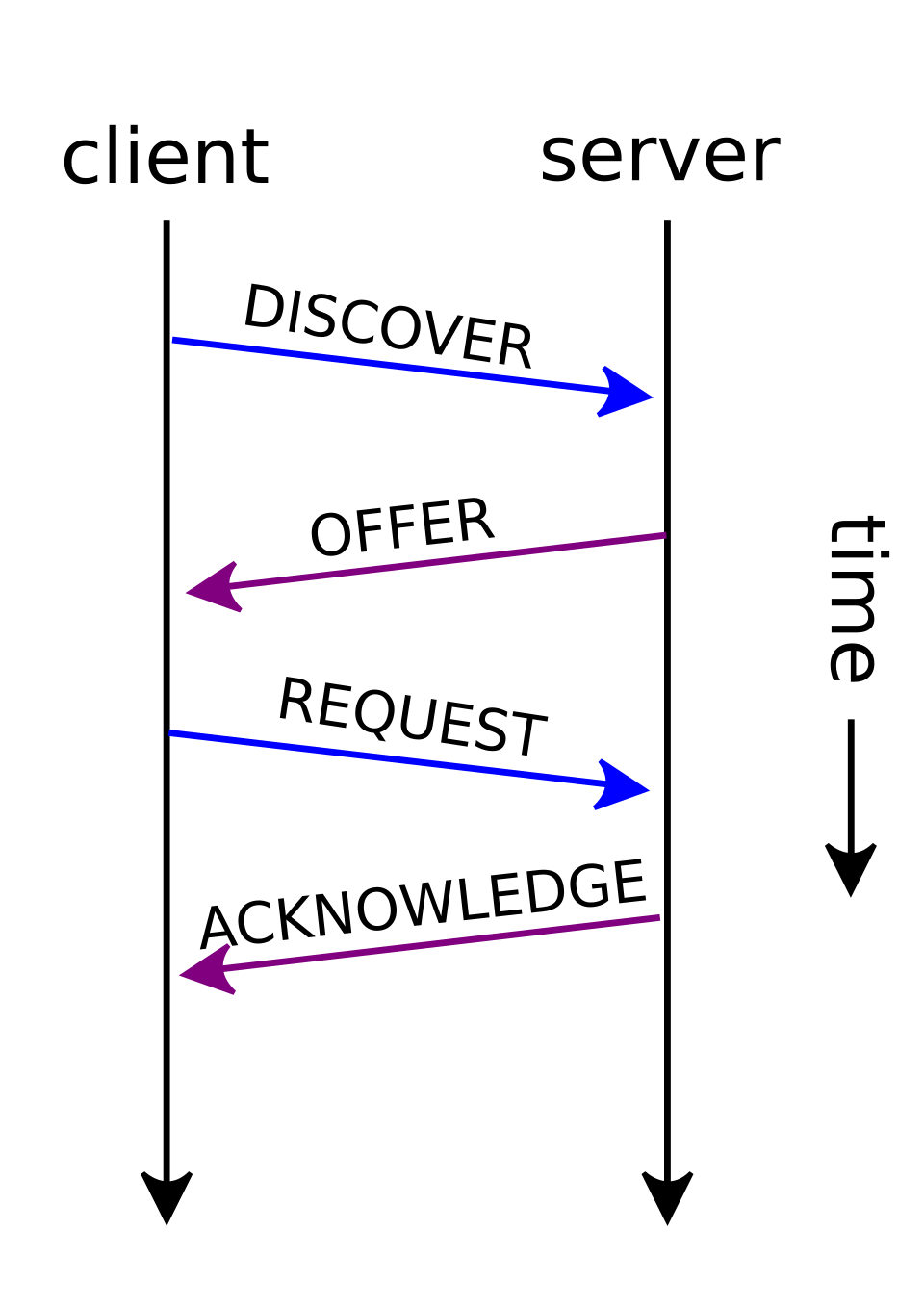
DHCP uses a process called DORA. DORA is an acronym of Discover, Offer, Request and Acknowledge messages. DORA is also referred to a 4-Way handshake.
DHCP server and client uses the UDP protocol however DHCP server uses the port number 67 whereas DHCP client uses port number 68.
A simple analogy of DORA process would be:
Guest: Walks in Hotel and shouts “I need a room”.
Reception: Hears guest and responds we have a Room 101 available.
Guest: Thanks, I’ll take the room 101.
Reception: Hands you the keys and says done, Room 101 is booked for you.
Analogy is very much the same as a Client requests the IP address and DHCP servers provides the available IP address. Let’s put the same DORA process in technical terminology:
Client: Sends a broadcast message Discover asking for IP address.
DHCP Server: Receives the broadcast message and responses with Offer message back to the Client.
Client: Client sends a message Request back to DHCP Server asking for the IP address sent in offer message.
DHCP Server: Server sends a final message Acknowledgement confirming IP address is now assigned to you.
DHCP 4-Way Handshake
DHCP 4-way handshake is a a DORA process between client and server.
DHCP Message Format
DHCP message format defines fields of a DHCP message. This message format is a good reference point to Wireshark packet capture on DHCP message.
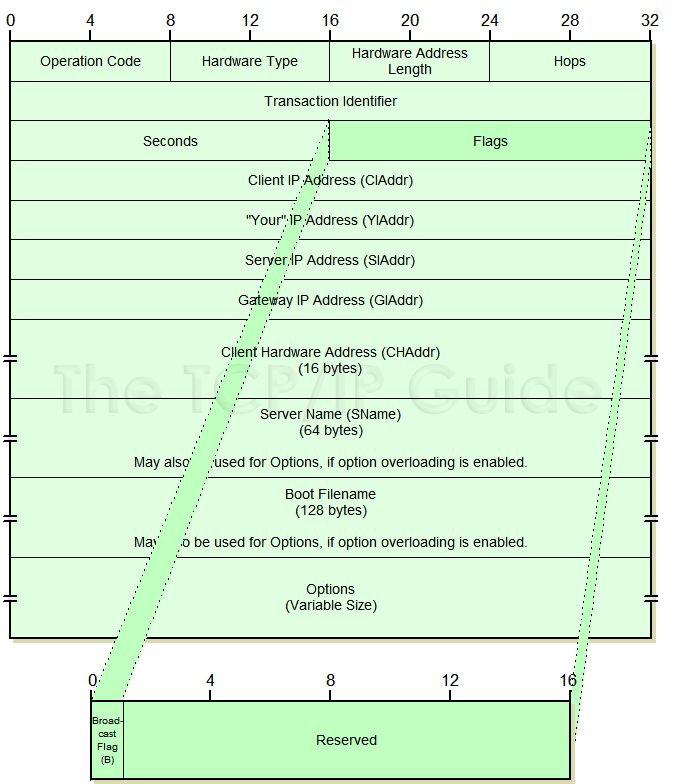
- Operation Code: Basically it tells which direction the message is going. For example, OP Code 1 referred to client message which can be either Discover or Request. OP Code 2 is referred to server message i.e. Offer, Acknowledge or Negative Acknowledgement. We have not touched on NAK yet but we will see it in practice later on.
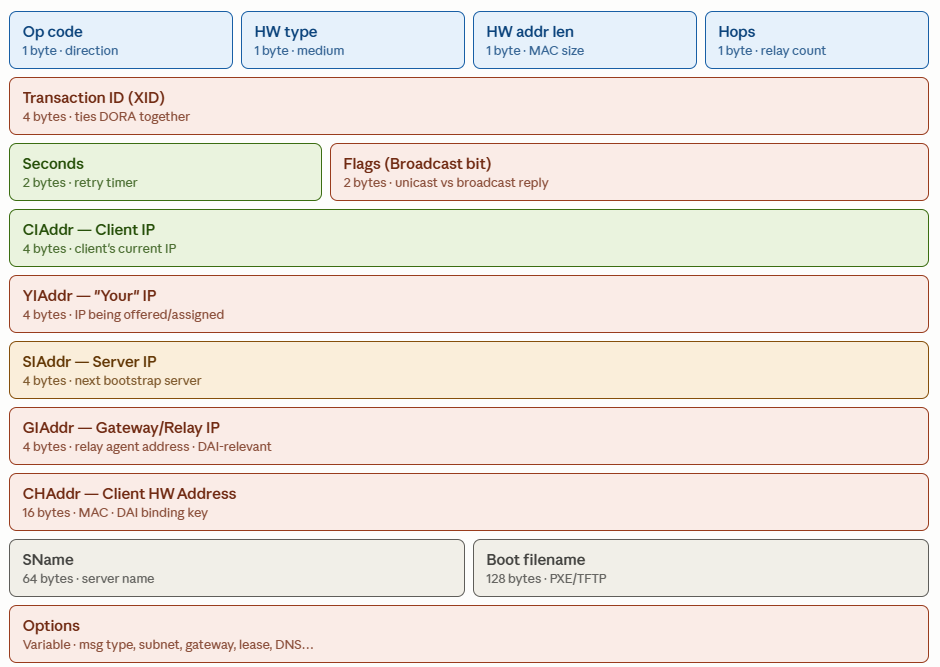
Other fields in the DHCP message format are listed below in the chart, each field has a small explanation to go over.
Detailed DHCP Message Format
Each DHCP message field is described with their role. Once again a good reference point with Wireshark packet capture.
Summary
DHCP is a great tool to automate IP address assignment in your network. It’s difficult to imagine an enterprise network without DHCP. As it is considered a valuable tool it can be overlooked if wireless clients suddenly stops working but wireless client will seems like it is connected to Wi-Fi however there is no network. DHCP executions must be reviewed in cases like that. I hope this post give you a good first look at DHCP and made you interested to dive deep into the DHCP.
References
Images are not owned, they are simply referred from following sources.
- Wikipedia
- http://www.tcpipguide.com/
- Claude AI