DHCP Snooping - Trusted Versus Untrusted
Overview
Networking protocols provide services to achieve a specific goal as per their design. However, an attacker can take benefit of these protocols to destruct the main functionality.
Today’s topic is DHCP, we know DHCP provides network addresses to the client’s and servers upon a dynamic request. DHCP Server uses DORA process in the sequence of DISCOVER, OFFER, RESPONSE AND ACKNOWLEDGE messages to provide network addresses to clients. Client is referred to any device that needs to learn network addresses dynamically and Server is referred to a DHCP Server which provides the network addresses to clients.
- Client sends DISCOVER and REQUEST.
- Server sends OFFER and ACKNOWLEDGE.
There are two more messages that clients uses - DHCP RELEASE and DHCP DECLINE. These messages are only used by client. A client can tell the DHCP server that it no longer needs to use the network address, basically releasing the network address back to DHCP Server with DHCP RELEASE message. The CMD command ipconfig /release on the Windows system uses the DHCP RELEASE message.
A Client can also send a DHCP DECLINE message to DHCP server stating it does not need the IP address during a DORA process.
DHCP messages are broadcasted on a single broadcast domain, means anyone connected on the domain can receive these messages. By default switches has no mechanism filter DHCP messages on which port they should be received or sent, thus we need DHCP Snooping to trust or untrust switch interfaces.
DHCP Snooping
DHCP Snooping analyzes incoming messages on the specified subset of ports in a VLAN and may filter DHCP messages using a simple logic either allow or discard the packet based of the switch port configuration. Basically, configuring the switch interface to either untrust or trust any DHCP messages are received.
Untrusted Port
- DHCP messages received on a untrusted port, normally send by a server will always be discarded. Messages like DHCPOFFER and DHCPACK.
- DHCP messages received on a untrusted port, sent by a DHCP client, may be filtered if they appear to be the part of an attack. Messages like DHCPDISCOVER and DHCPREQUEST.
Trusted Port
- DHCP messages received on a trusted port will be forwarded; trusted ports do not filter (discard) any DHCP messages.
Trust ports if
- A DHCP server connected to switch port, so the DHCPOFFER and DHCPACK messages can be sent.
- A trunk port (link between switches), so that DHCPOFFER and DHCPACK messages can reach to the destination client.
- A router interface is connected to switch, so that router can relay the DHCP requests to the DHCP server which maybe on a different network.
Untrust ports if
A client is desktop, laptop, printer or a VoIP phone since they do not send DHCPOFFER and DHCPACK messages however, a attacker can connect to these ports and attempt to send DHCPOFFER and DHCPACK.
- Switch ports that are open in public area like conference rooms and physical access to wall port is easily available.
- A port connects to a Wireless Access Point, Clients connected via an AP can try to spoof DHCP server responses if switch ports left trusted for APs.
DHCP Snooping Binding Table
DHCP Snooping binding table is built dynamically by the switch through a process of “listening in” (snooping) on the 4-step DORA process between a client and a server.
A binding table tracks which (MAC address) is allowed to use which IP address on a specific physical port. Switch creates an entry in the binding table once it sees a successful lease is formed by a client.
A binding table does sounds like a MAC Address table however they both are different from each other.
A MAC Address table is build from any frame whereas a binding table is build from DHCP 4-step handshake.
A MAC Address table only maps MAC Address to VLAN and Physical port whereas a binding table maps the MAC address to IP Address, Lease, Type, VLAN and Interface.
DHCP Snooping Configuration
DHCP Snooping is configured using following set of commands, each line of the command is explained to understand what is the expected behavior of commands.
1
2
3
4
5
6
SW1(config)#ip dhcp snooping
SW1(config)#ip dhcp snooping vlan <vlan-id>
SW1(config)#interface range gig0/0-1
SW1(config-if)#ip dhcp snooping trust
SW1(config-if)#exit
SW1(config)#no ip dhcp snooping information option
The first command
ip dhcp snoopingdoes not enable anything for DHCP snooping however it tells the switches CPU that carved-out some memory to create the DHCP snooping binding table we are going to need.The second command
ip dhcp snooping vlan <vlan-id>basically enable the DHCP snooping on the VLAN of your choice.
At this point we have turned all interfaces on switch into untrusted ports, even the dhcp server’s messages will be dropped due to option 82 being inserted into DHCP packets. To allow dhcp server to send messages into the network we need to manually trust switch interfaces that are either connected to DHCP server or an interface to router that connects to a different network as well as disable option 82.
Note: Option 82 means there is no relay agent in the path, the DHCP server must discard the packets.
- The third command basically takes us into the interface mode of gig0/0 and gig0/1.
- The forth command is used to trust the interfaces for DHCP messages
OFFERandACKreceived from server. - The fifth command takes us from interface config mode to global config mode.
- The sixth command basically disables the option 82 so DHCP servers can receive packets.
Clients should receive an IP address from DHCP server. Some debug or packet capture can be used to understand the flow of packet while following each commands mentioned above.
DHCP Snooping Diagram
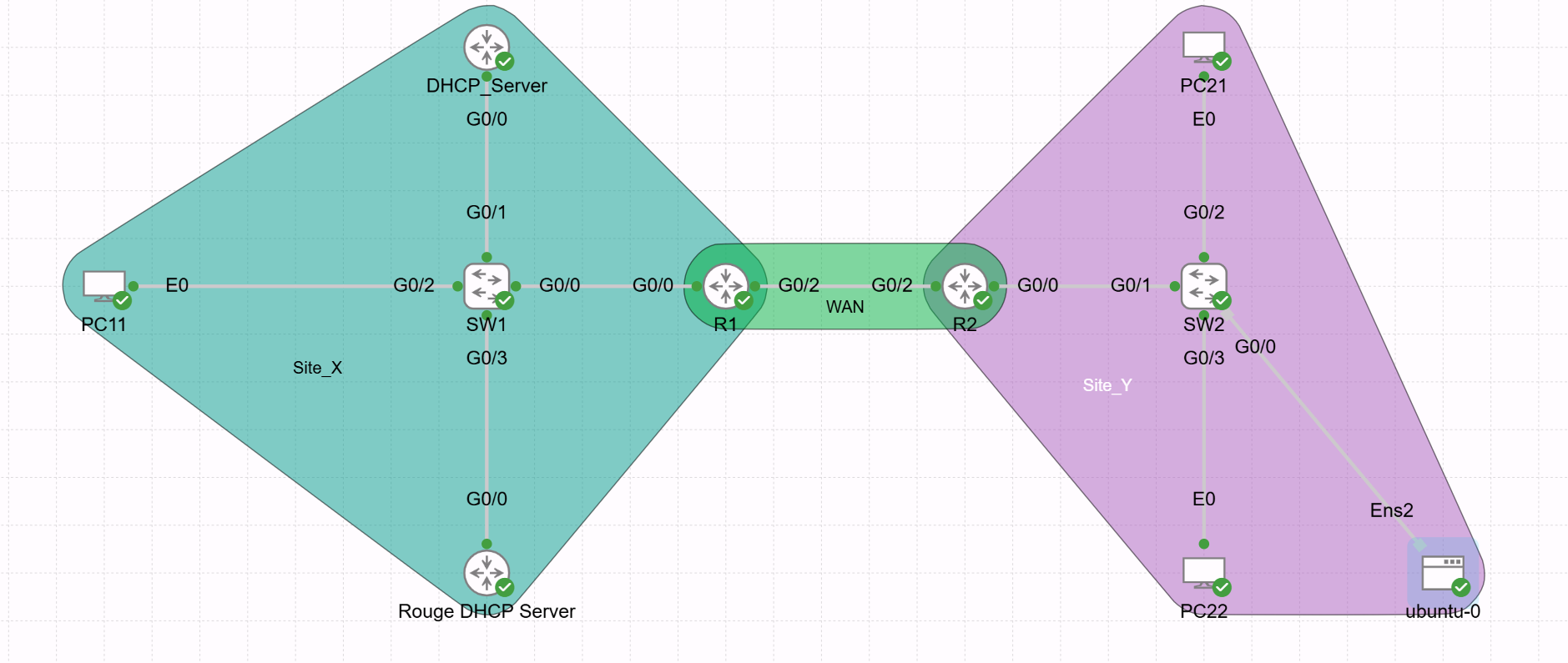
To receive IP addresses, clients in site Y needs connects to site X. SW1 interface’s that either connected to DHCP Server or default gateway needs to be trusted.
Summary
We learnt DORA process of DHCP then why we need DHCP snooping and how it works on a cisco switch. Understanding commands and how they operate at switch level is a key take away from this post.